 TextDocket
Export your texts for court, with page numbers and checksums.
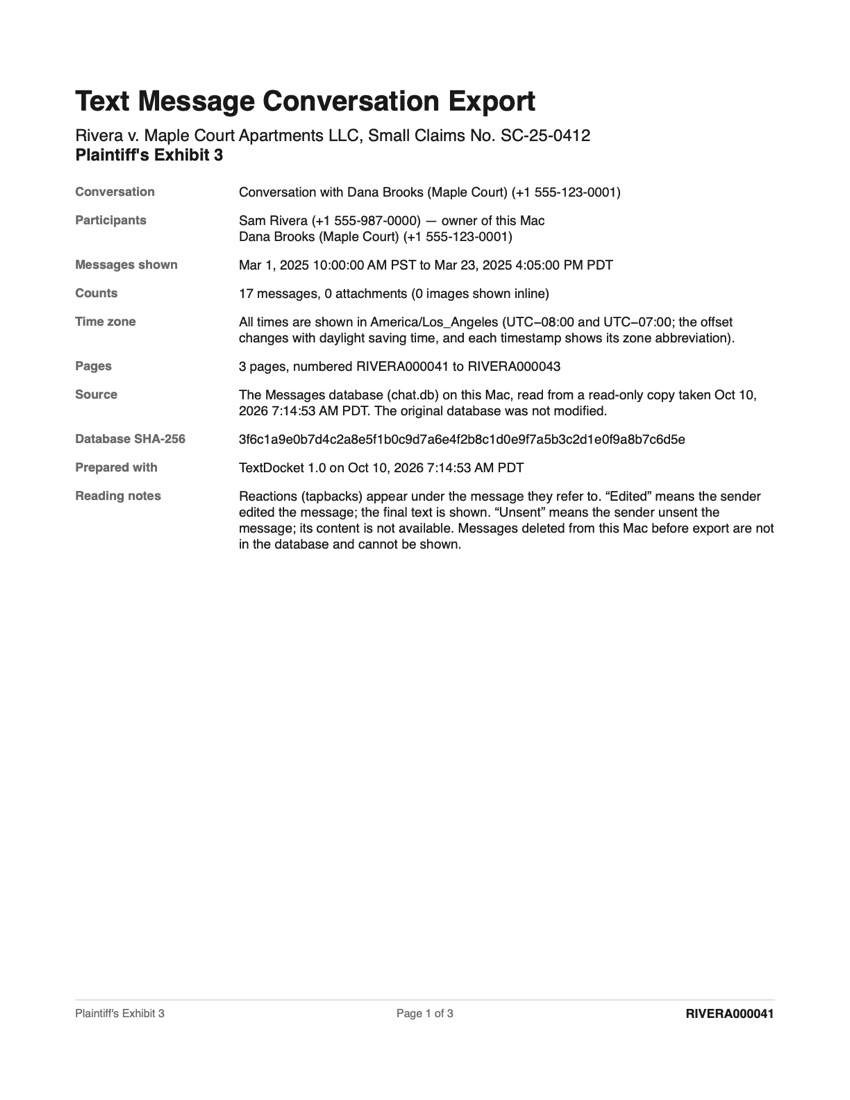
TextDocket turns an iMessage or SMS conversation on your Mac into a clean PDF: the sender and exact time on every message, page numbers, and Bates numbers. Made for sharing with your lawyer, a mediator, or the clerk. Courts decide whether evidence is accepted.
Direct download? Buy a license key for $14.99 · Find my key
Both versions are free to download; complete exports are a one-time $14.99 purchase. macOS 14 or later, Apple silicon or Intel.
Three steps. No cables, no phone backup.
TextDocket reads the messages already on your Mac, not your iPhone. Start by making sure they are there.
Before you start: get your iPhone messages onto your Mac
TextDocket can only export what the Messages app on your Mac shows, so open Messages on your Mac and check the conversation is there.
iMessages (blue bubbles)
- On your iPhone, open Settings › your name › iCloud and turn on Messages in iCloud.
- On your Mac, open Messages › Settings › iMessage, sign in with the same Apple ID and tick Enable Messages in iCloud.
- Keep Messages open on your Mac while your history downloads. Long histories can take a few hours.
Text messages (green bubbles)
- On your iPhone, open Settings › Apps › Messages › Text Message Forwarding. On iOS 17 and earlier it is under Settings › Messages.
- Turn on your Mac in the list.
- Texts that arrive from now on show up on your Mac. Older texts appear only if Messages in iCloud has already synced them.
Messages in iCloud uses your iCloud storage. If your storage is full, syncing stops until you free up space. After syncing, choose File › Reload Messages in TextDocket.
Choose your Messages folder
The first time, macOS asks you to pick a folder. Choose the folder named Messages and click Allow. If the window opens somewhere else, press Command-Shift-G, type ~/Library/Messages and press Return.
Pick the conversation
Search by name or number, and limit the export to the dates that matter.
Preview and export
Add a case name and exhibit label, check the live preview, and save the export folder.
Everything in one export folder
Organized so a lawyer, a judge, or the other side can follow the conversation and point to an exact page.
Cover page
Case name, exhibit label, everyone in the conversation, the date range, time zone, and message count.
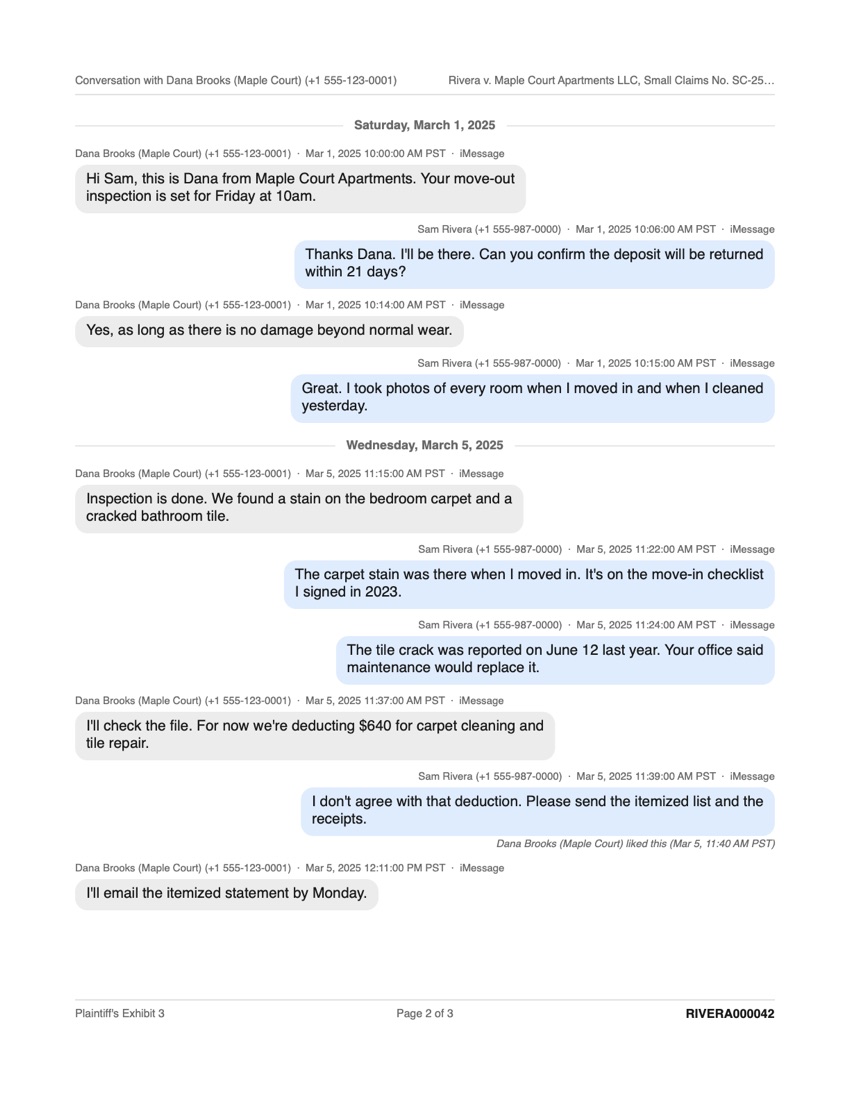
Exact time on every message
Date, time to the second, and time zone next to each message, with the sender’s phone number or email.
Bates numbers
Your own prefix and starting number on every page, plus “Page X of Y”.
Photos in place
Images appear where they were sent. Edits, unsent messages, and reactions are noted. Originals are copied to the folder.
Spreadsheet index
messages.csv lists every message with its date, sender, and the page it appears on.
File fingerprints
A SHA-256 fingerprint of each exported file, so anyone can check the files have not changed since export. The cover page and verification report also record the macOS user and macOS version that made the export.
Download a sample export
A group chat between tenants and their building manager about a heating outage, exported by TextDocket 1.0.2: 3 pages numbered SAMPLE000001 to SAMPLE000003, 16 messages, one photo, and reactions. The page column in messages.csv tells you which Bates-numbered page each message is on.
The people, phone numbers, and messages are invented. This sample shows the format only. The fingerprints show whether a file changed after export; they do not show that the messages are genuine.
- PDFCover page and conversation, 83 KB
- messages.csvOne row per message, with its page
- verification.txtExport details and SHA-256 fingerprints
- Whole folder (.zip)PDF, CSV, report, and the photo, 98 KB
TextDocket or the free ways?
Screenshots and printing from the Messages app cost nothing and are fine for a few messages. For a long conversation you need to hand over, this is what changes.
| iPhone screenshots | Print from Messages on a Mac | TextDocket | |
|---|---|---|---|
| Choose an exact date range | No, one screen at a time | No, you scroll to load the history | Yes, start and end dates |
| Time on every message | No, hidden unless you swipe | No, times are grouped | Yes, to the second, with time zone |
| Sender’s phone number or email | No, contact name only | No, contact name only | Yes, as stored in Messages |
| Page numbers and Bates numbers | No | No | Yes, your own prefix |
| Spreadsheet of every message | No | No | Yes, messages.csv |
| File fingerprints (SHA-256) | No | No | Yes |
| Stays on your device | Yes | Yes | Yes, nothing is uploaded |
| Cost | Free | Free | Free to try; $14.99 once for complete exports |
Comparing paid apps such as Decipher TextMessage and iMazing? See the best apps to print text messages for court.
Private by design
These are some of the most personal conversations you have. TextDocket never sends them anywhere.
It reads a temporary, read-only copy of your Messages database, so your messages are never changed.
- Works entirely on your Mac, even offline
- No account, no uploads, no analytics
- Never edits or deletes your messages
- Sandboxed and notarized by Apple
Guides
- How to print iMessages from a MacEvery way to print a conversation from Messages on your Mac, and what each one keeps.
- How to export iMessage conversations to PDFBuilt-in macOS options, their limits, and a clean numbered PDF in one step.
- How to print iPhone text messages for courtWhat lawyers usually ask for: senders, exact times, page numbers.
- Best apps to print text messages for courtA side-by-side comparison of the tools people use, with prices.
Questions
Do I need to connect my iPhone?
No. TextDocket exports the messages already on your Mac. To bring them over, turn on Messages in iCloud on your iPhone and your Mac for iMessages, and turn on Text Message Forwarding on your iPhone for green text messages. Step-by-step instructions.
Why are some green text messages missing?
Green bubbles are SMS text messages, not iMessages. On your iPhone, go to Settings › Apps › Messages › Text Message Forwarding (Settings › Messages on iOS 17 and earlier) and turn on your Mac. New texts reach your Mac from that moment on. Older texts appear only if Messages in iCloud has already synced them, so open Messages on your Mac and check the conversation before you export.
Will a court accept the PDF?
That is up to the court. TextDocket gives you a clear, complete, numbered record of the conversation. Rules differ by court and case type, so check with your lawyer or the court’s self-help center.
What does it cost?
TextDocket is a free download. It lets you preview and export the first 50 messages with a watermark; a one-time purchase of $14.99 (US) unlocks complete exports. No subscription.
App Store or direct download?
It is the same app. In the Mac App Store version you unlock complete exports with an in-app purchase, and Restore Purchases works on any Mac with your Apple ID. If you buy on this site, you get a license key: download TextDocket, click Enter License Key and paste it. A purchase made one way does not unlock the other version. Lost your key? Get it again here.
Can it recover deleted messages?
No. Messages deleted from your Mac before you export are not in the database, so TextDocket cannot show them.
Which Macs are supported?
Any Mac running macOS 14 Sonoma or later.
Get TextDocket
Download it free, preview your conversation, and unlock complete exports with a one-time $14.99 purchase. No subscription.
Direct download? Buy a license key for $14.99 · Find my key